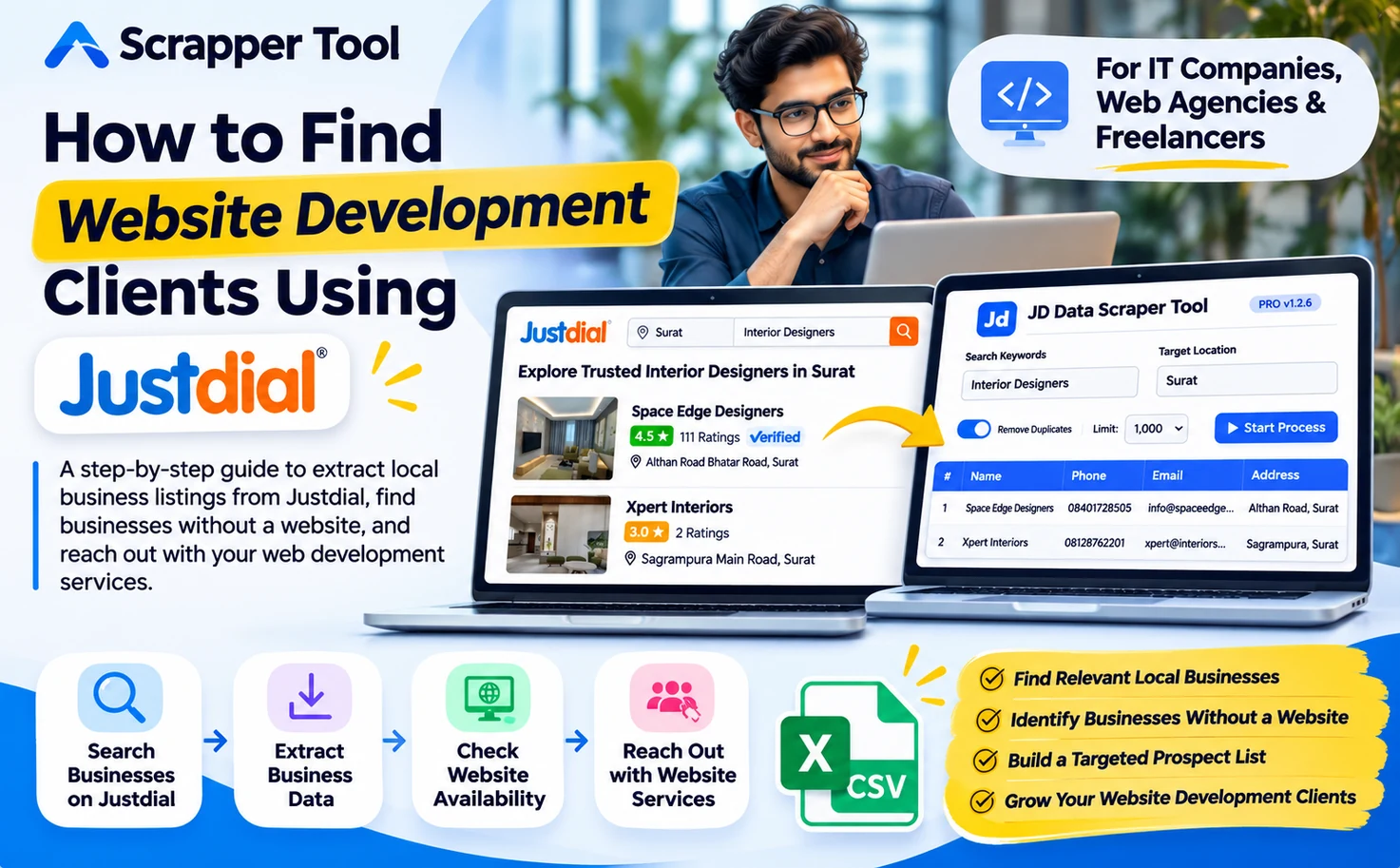

Finding website development clients using Justdial can be a practical prospecting method for web design agencies, IT companies, freelance developers, and local digital marketing teams. Rather than contacting random businesses, you can research companies in a specific category and city, organize publicly visible listing details, and check which businesses could genuinely benefit from a new or improved website.
For example, an agency that builds websites for pest control companies might start by researching providers in Pune. Some businesses may have no independently verified website, some may rely mainly on a directory profile, and others may have websites with clear opportunities to improve their enquiry process. Each situation calls for a different offer.
This guide explains how to use Scrapper Tool’s JD Data Scraper for the business-research stage, qualify website opportunities manually, and prepare respectful outreach. The focus is on useful, verifiable prospect research—not mass messaging or guaranteed customers.
Quick answer: Choose a niche and city, collect accessible Justdial business listings with Scrapper Tool, export the available details to CSV or Excel, independently verify each business’s website presence, prioritize genuine opportunities, and contact suitable businesses through permitted channels with a relevant proposal. The scraper helps build the research list; it does not automatically confirm that a business has no website.
Why Justdial Can Be Useful for Website Development Prospecting
Justdial is a local business directory where people look for companies by service category and location. An IT agency can use listings as a starting point to research businesses it might serve—such as interior designers, coaching centres, local repair services, pest control companies, or independent suppliers.
The business opportunity is not simply that a company is listed on Justdial. The opportunity appears only when you identify a specific website or customer-enquiry need. Examples include a business with no verified independent website, outdated service pages, a difficult mobile contact form, or no clear way for a customer to request a quote.
A directory profile can still be valuable to that business. The aim is not to replace it automatically; it is to understand whether an independently managed website could provide additional value.
What Is a JD Scraper?
A JD scraper is a tool that helps organize business information available from Justdial search results into structured records. Scrapper Tool offers a JD Data Scraper Chrome extension with keyword-and-location searches, supported search-page URL input, duplicate controls, result limits, progress counts, and CSV/Excel export.
Depending on the publicly visible record and the tool’s supported fields, output may include business name, category, city, area, address, PIN code, business phone number, a JD virtual phone number, rating, review count, and source listing URL. Fields vary by listing and must be checked.
Important limitation: The JD Data Scraper service documentation does not confirm an automatic website-presence field or a “no website” filter. You will need to verify website status separately. Do not label every record with no website information in your spreadsheet as a business without a website.
Who Can Use This Workflow?
- Website development companies: Find companies whose customer-facing websites could solve a clear business problem.
- Freelance web designers: Focus on one city or niche rather than competing for every possible project.
- Digital marketing agencies: Identify prospects that could benefit from clearer landing pages, forms, or online enquiry journeys.
- Local SEO consultants: Review whether a business has consistent service, location, and contact information across its directory profile and website.
- IT service providers: Research prospects for website maintenance, booking flows, or other relevant digital improvements.
Step-by-Step: Find Website Development Clients Using Justdial
Step 1: Define Your Target Customer Before Searching
Choose one type of business and one location. For example, target pest control companies in Pune, interior designers in Surat, or coaching centres in Rajkot. Focused research helps you understand what those businesses sell and which website features their customers may need.
Write down your ideal prospect: independent business or franchise, service area, type of customer, likely website need, and whether your agency has relevant portfolio work. A list of 30 reviewed companies can be more useful than an unqualified list of hundreds.
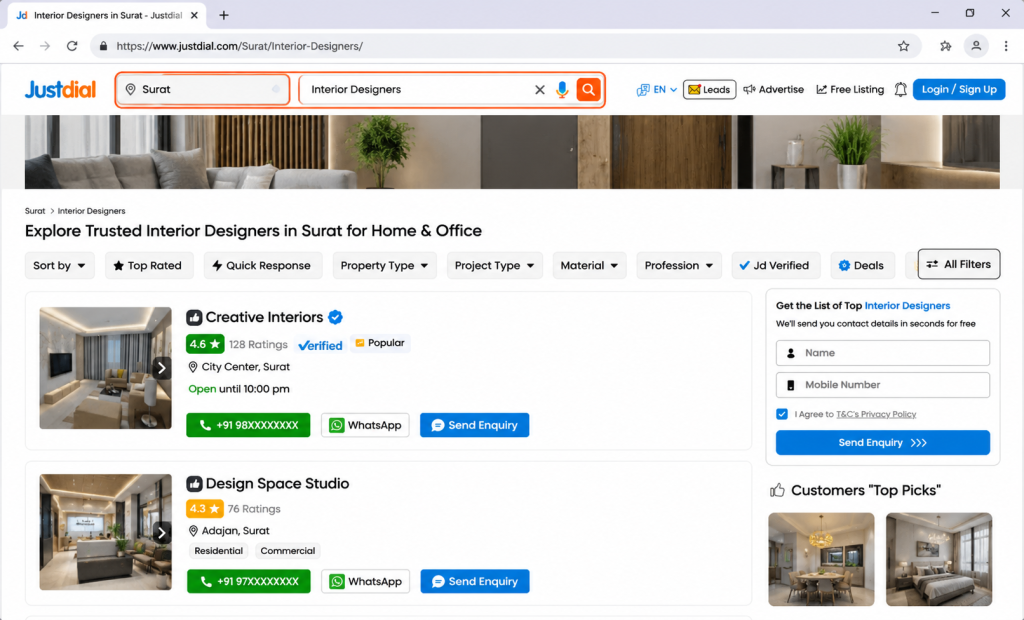
Select a target business category and city on Justdial to begin researching website development opportunities.
Step 2: Search Justdial for Relevant Business Listings
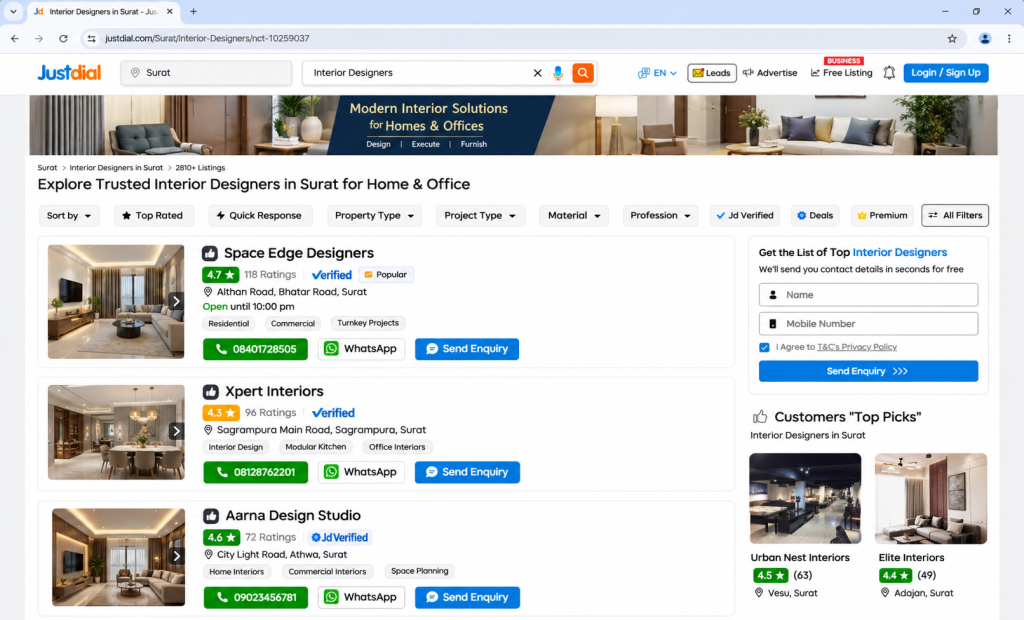
Open Justdial and search for your chosen category and city. Review a few listings manually to see whether they represent the businesses you want to serve. Note categories, areas, business names, and the source page you used.
Do not assume every listing is active, independent, or a suitable client. A branch of a national company may not control its own website decisions; a closed or duplicate business should not remain in your prospect list.
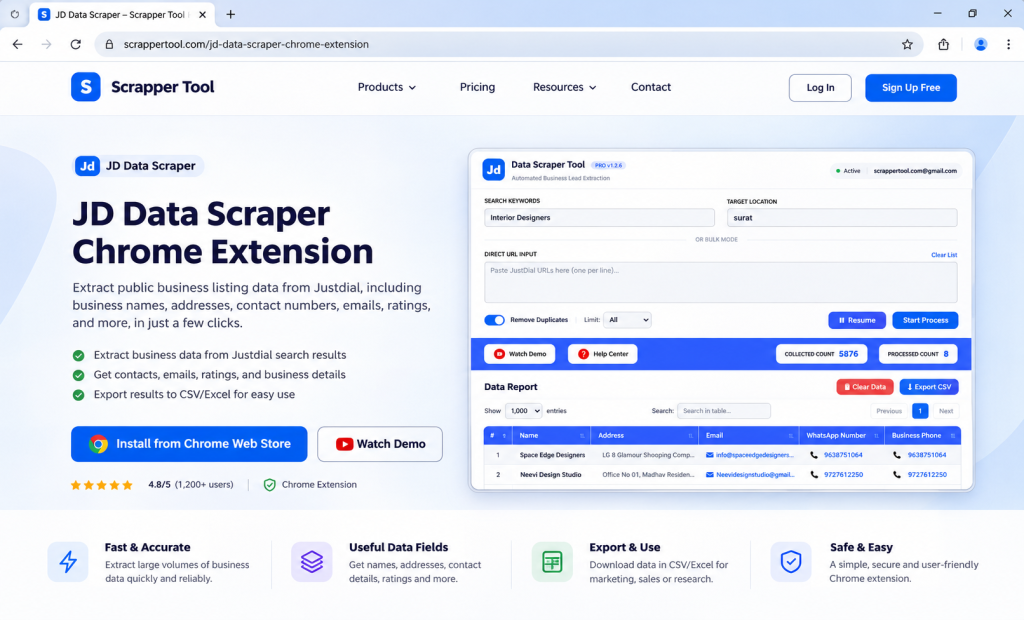
Step 3: Open Scrapper Tool’s JD Data Scraper
Visit the JD Data Scraper service page and use the official Chrome Web Store installation link. Install the extension after reviewing its permissions, then pin it to Chrome if useful.
Its documented workflow supports keyword/location research and inputting supported public search-page URLs. Use whichever method is available in your installed version. Exact control names can vary across versions, so take real screenshots from your live extension.
Step 4: Enter the Category, Location, or Supported URLs
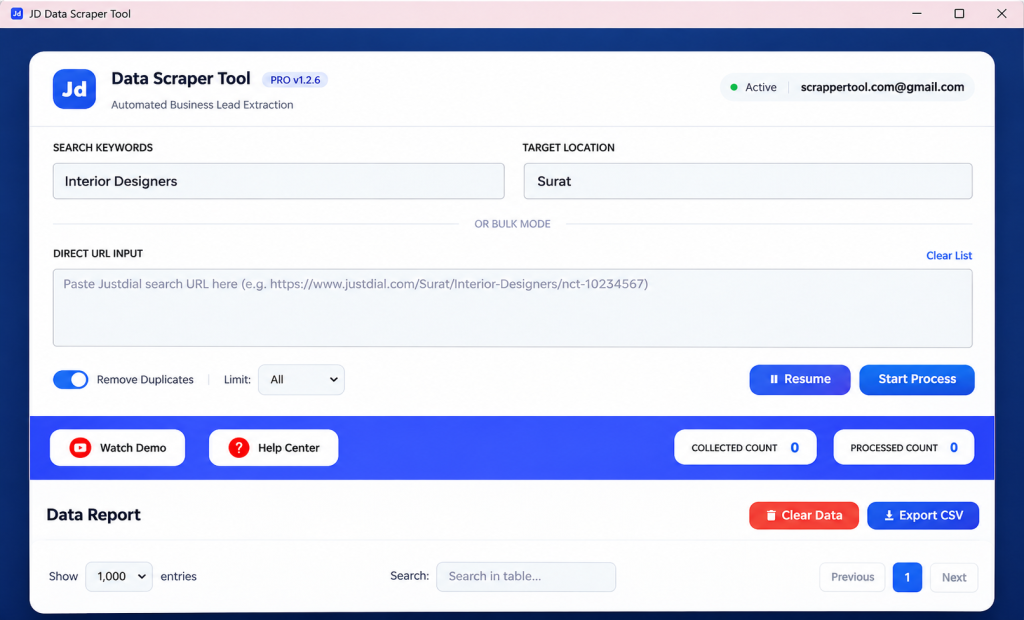
In the JD Data Scraper interface, configure the target business category and location, or paste a supported Justdial search-page URL. For example, start with one category in Pune instead of combining unrelated business types.
If you have several appropriate source URLs, use the bulk URL input only in the manner supported by the extension. Record where the data came from so your team can revisit any listing later.
Step 5: Run a Small Collection Test and Remove Duplicates
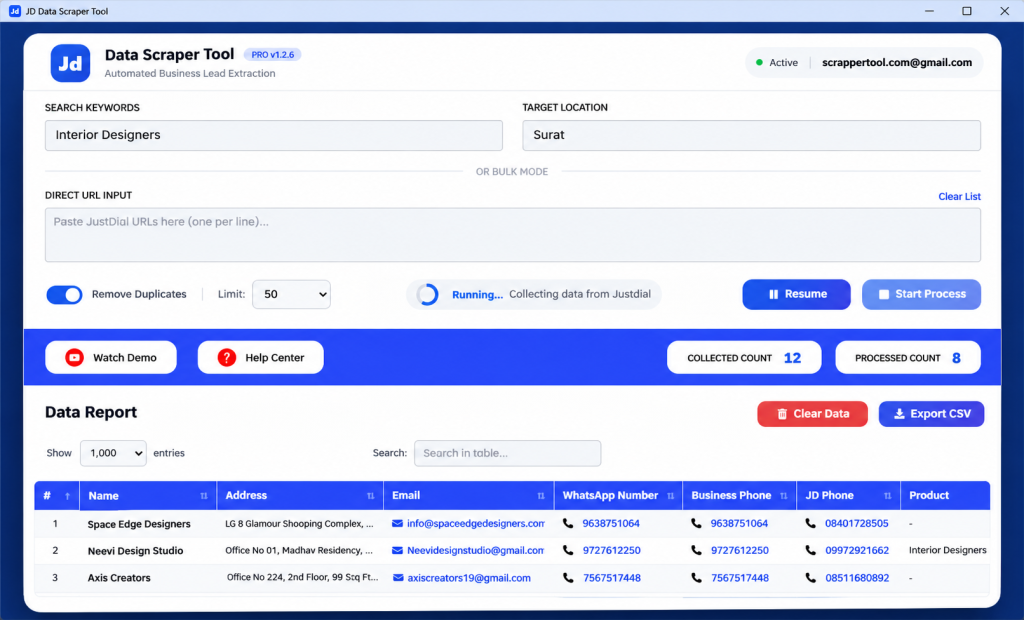
Start with a small set of results, inspect the output, and enable the duplicate-handling option where supported. The tool offers result-limit controls and live collected/processed counts. A small test makes it easier to spot incorrect categories, repeated listings, or location mismatches before doing further research.
Respect Justdial’s applicable platform terms, access conditions, and technical limits. Do not bypass authentication or other controls to obtain information.
Step 6: Export a Business Research List to Excel or CSV
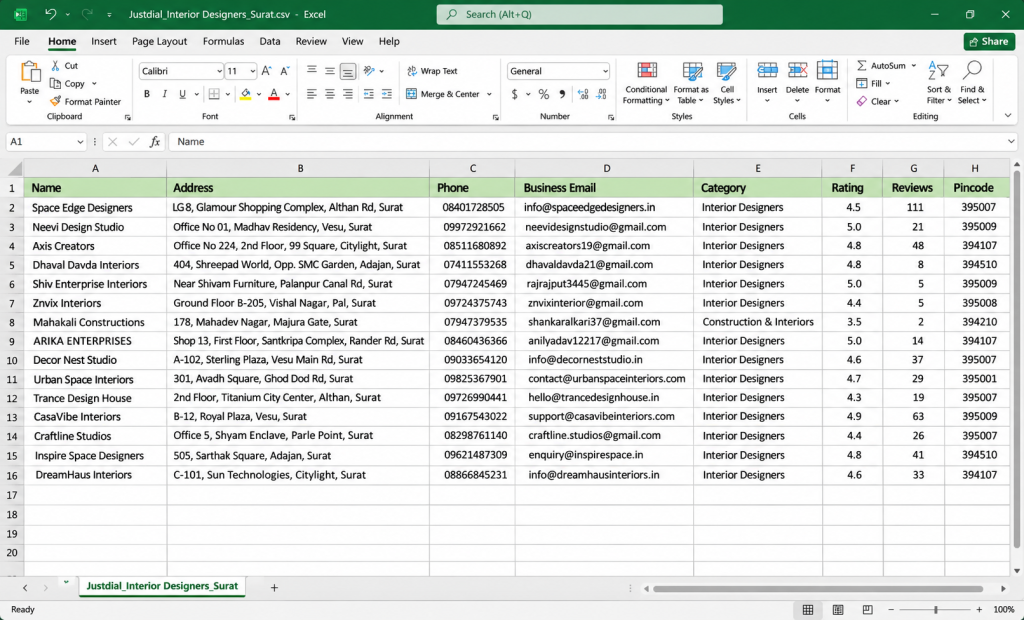
When the collection is complete, download the available CSV or Excel output and open it in your spreadsheet application. Keep an untouched original export and create a separate working sheet for qualification. This makes it possible to review and correct entries without losing the source data.
Useful source fields may include business name, category, city, area, address, PIN code, a business phone number, rating and review count, and the Justdial listing link. Any missing field should remain blank until verified; do not invent phone numbers, websites, or owners’ names.
Step 7: Verify Which Businesses Actually Need Website Help
This is the most important step. A Justdial listing is not proof that a business lacks a website. Before labeling a company as a “no-website prospect,” independently check its public profile, search for its business name plus city, look for an official domain, and review any linked Google Business Profile or other public business channels.
If you find an independent website, review it for a genuine problem: unclear services, broken contact forms, missing mobile-friendly enquiry paths, or outdated details. If you cannot confirm whether a website exists, mark the status as Needs verification, not “No website.”
Use simple categories in your working sheet: Website verified, No independent website found after checks, Website improvement opportunity, and Needs further verification.
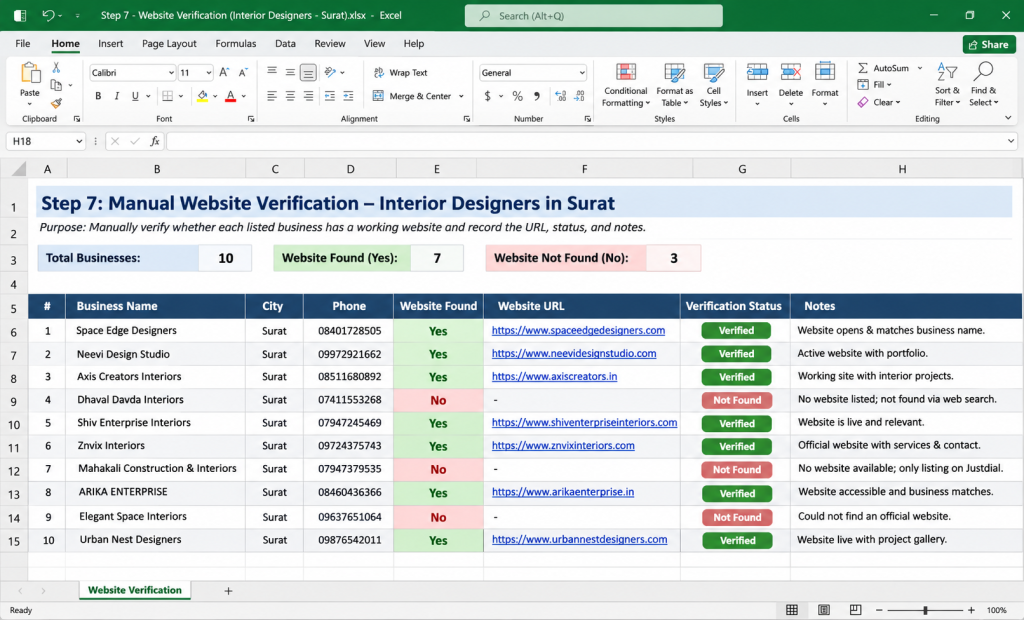
Step 8: Build a Qualified Website Development Prospect Sheet
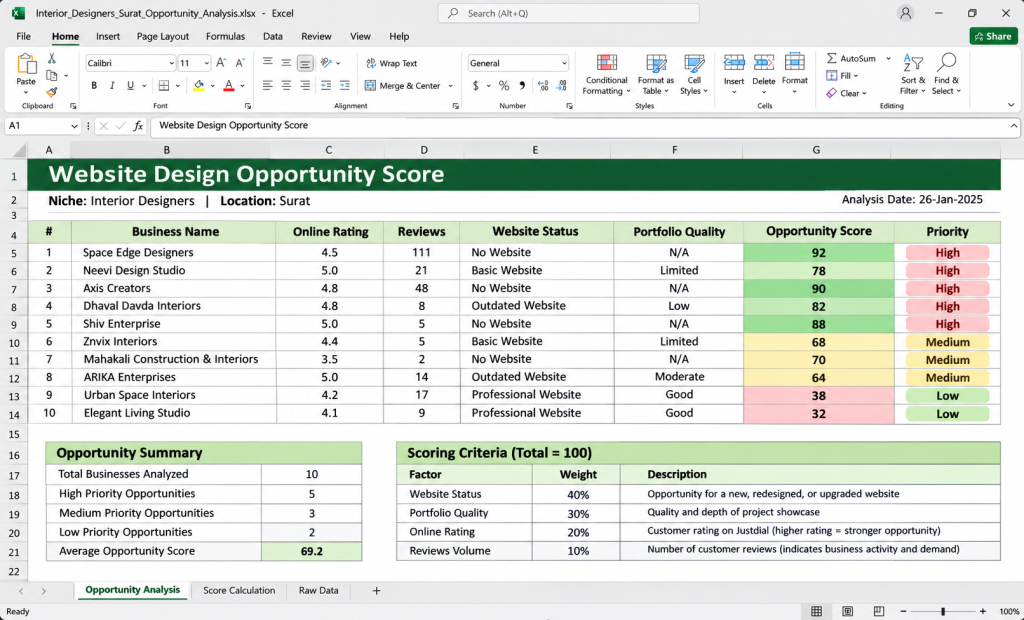
Add manual research columns beside the original export. The following structure keeps the prospect list useful for an actual sales team:
| Field | What to record | Why it matters |
|---|---|---|
| Business name | Name from the source, verified if needed | Identify the company correctly |
| Category / city | Relevant service niche and location | Determine your ideal customer fit |
| Source listing URL | Original Justdial business link | Recheck the source |
| Website status | Verified / no site found / needs review | Avoid unsupported assumptions |
| Specific opportunity | No clear enquiry flow, missing website, broken form, etc. | Make the offer relevant |
| Business contact | Verified public business channel if available | Choose an appropriate communication method |
| Priority | High / medium / not a fit | Focus your research effort |
| Verification date | Date of manual review | Keep information current |
| Outreach status | Not contacted / replied / opted out | Avoid repeated unwanted contact |
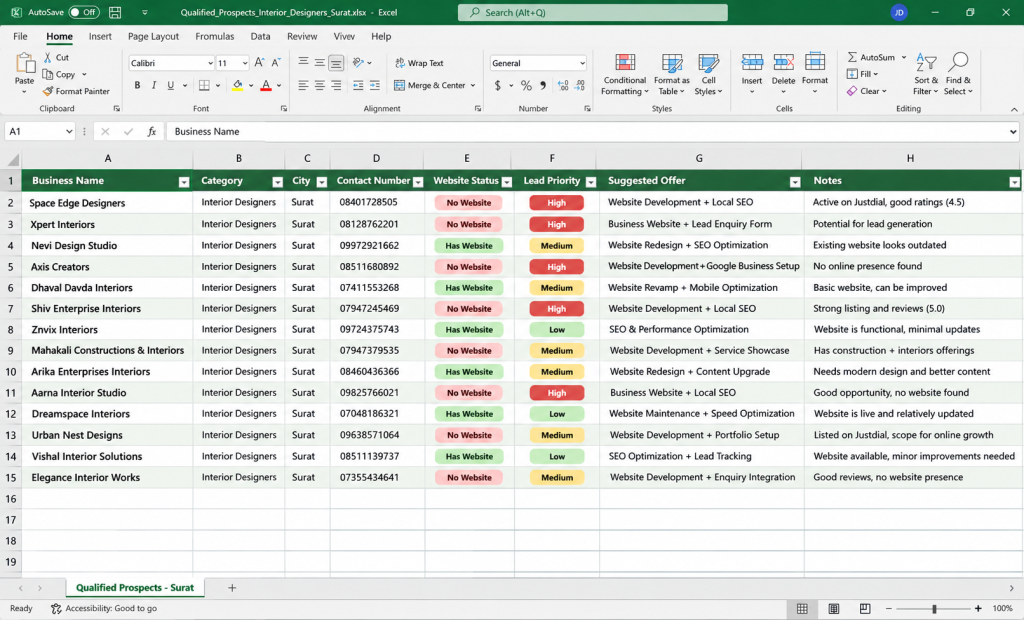
Step 9: Prioritize Businesses Where Your Service Adds Value
Do not pitch every business. A high-priority prospect should fit your service niche, appear operational, and have a verified website gap that your agency can solve. A business that already has an excellent website may not be a fit, even if its Justdial listing is prominent.
Consider creating an internal scoring rule: business fit (0–2 points), verified website opportunity (0–2), and clear relevance of your offer (0–2). A higher score simply tells your team where to review first—it does not predict that someone will buy.
For a pest control business, a small website might make it easier for customers to see covered locations, pest types, safety information, and booking or quote options. For an interior designer, a visual portfolio and enquiry form might matter more. Tailor the solution to the business’s real customer journey.
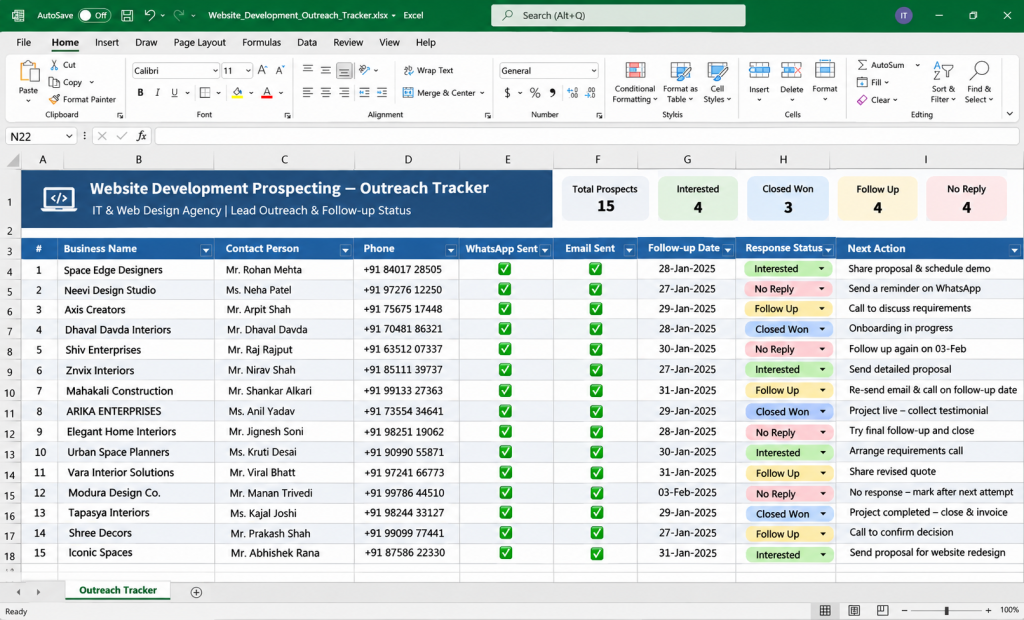
Step 10: Approach Suitable Businesses With a Specific Offer
Your first message should explain why you selected that business and how you may help. Do not say “you have no website” unless you verified that claim. Avoid promises such as guaranteed enquiries, guaranteed rankings, or a certain number of new customers.
For a qualified business with no independently verified website, a respectful opening could be:
Hello, I was researching pest control businesses in Pune and came across your public business listing. I wasn’t able to find a dedicated website after checking the available information. My team builds straightforward service-business websites with clear service areas, enquiry forms and mobile contact options. Would it be useful if I shared a short example relevant to your business?
If a website exists but has an issue, mention only the issue you actually observed, such as a form error or a difficult mobile booking flow. Stop contacting people who decline or opt out, and use only lawful, platform-permitted business communication channels.
Example: How an IT Agency Might Research Pest Control Companies in Pune
Illustrative scenario, not a real campaign or verified results: An IT agency wants to offer simple service websites to independent pest control businesses in Pune.
- It searches a relevant category and city on Justdial.
- It collects accessible public listing details using Scrapper Tool’s JD Data Scraper.
- It removes obvious duplicate and irrelevant entries in Excel.
- It manually checks each candidate’s independent website presence.
- It records whether the company has no verified website or a specific website improvement need.
- It reviews which businesses match the agency’s target market.
- It prepares a niche-specific sample: service pages, area coverage, trust information and a request-a-quote form.
- It approaches suitable businesses respectfully and records the response.
The output is a reviewed prospect list, not a guaranteed set of buyers. The value of the process comes from research quality and the relevance of the proposed website, not the number of exported rows.
What Should You Offer Different Types of Justdial Businesses?
| Business category | Possible website need | Appropriate example offer |
|---|---|---|
| Pest control companies | Service area and request-a-quote information | Service pages and enquiry form |
| Interior designers | Project examples and consultation requests | Portfolio website with enquiry flow |
| Coaching centres | Courses, batch information and enquiries | Course pages and admissions enquiry form |
| Independent restaurants | Menu, hours, directions and booking details | Mobile-friendly menu and contact page |
| Local suppliers | Product catalogue and B2B enquiry path | Catalogue pages and quote form |
These are possible needs to investigate, not assumptions about every company in the category. Verify the actual gap before offering a solution.
Manual Justdial Research vs a Structured Scrapper Tool Workflow
For a handful of businesses, copying information manually may be enough. When researching a defined category and city, Scrapper Tool can reduce repetitive collection and organize supported public listing fields into a consistent export. The extension’s documented controls include limits, duplicate handling, and progress tracking.
However, no export replaces checking company websites, deciding whether a business is an appropriate client, or understanding the requirements for consent-based business communication. Automate the repetitive research where permitted; keep qualification and outreach judgment human.
Common Mistakes That Waste Website Development Prospecting Time
- Treating a missing website field as proof: Verify website presence independently.
- Targeting every listing: A narrow niche and city can make your offer more relevant.
- Using the wrong contact: Verify that the number is an appropriate business contact; a JD virtual number is not necessarily the same as the business’s direct phone number.
- Ignoring duplicates: The same business can appear across multiple search areas or categories.
- Making unsupported claims: Never promise guaranteed traffic, rankings or customer enquiries.
- Sending repeated bulk messages: Follow applicable privacy, telecommunications and anti-spam rules, and respect opt-outs.
- Not checking whether a website helps: Some businesses already have sufficient online channels; be prepared to conclude they are not a fit.
How Scrapper Tool Fits Into the Website-Client Research Process
Scrapper Tool provides a no-code JD Data Scraper Chrome extension for organizing publicly available Justdial business records. It can support the discovery and data-export stage for IT companies researching local website projects. It does not verify the absence of a website, decide whether a business needs a redesign, or guarantee that a prospect will become a customer.
If you already understand the JD extension basics, see the existing JD Scraper setup guide. For a wider overview of prospecting channels, read How to Find Clients for Website Development. If your research starts with Google business listings, our Google Maps website-gap guide covers that separate approach.
Frequently Asked Questions
Can I find website development clients using Justdial?
You can use Justdial as a starting point for researching businesses by category and city. After collecting suitable public listing details, verify each company’s website needs and contact only relevant prospects through permitted channels.
Does Scrapper Tool automatically show businesses without websites?
Not as a confirmed feature of its JD Data Scraper. The public service documentation does not establish a built-in website-presence filter. Verify website status separately before labeling a prospect.
Which Justdial business categories are suitable for web design prospecting?
Potential categories include local service providers, interior designers, training centres, restaurants, and suppliers. Choose businesses your agency understands, then confirm whether a website would solve a real customer problem.
What details can I export from the JD Data Scraper?
Its documented output covers public business details such as names, categories, locations, addresses, PIN codes, business phones or JD virtual numbers, ratings, review counts, and source links where available. Exact output depends on the source listing and version.
How can I confirm whether a business has a website?
Review its public listing and search for the exact business name with the city, check any linked profiles and official domains, and confirm ambiguous cases manually. “No independent website found after checks” is more accurate than assuming absence from one directory field.
Can I use Justdial business data for marketing?
Only where the collection and intended use are permitted by applicable platform terms and laws. Public availability is not blanket consent for unsolicited calls, emails or bulk WhatsApp messages. Verify details and respect contact preferences and opt-outs.
How is this different from a general website-development lead guide?
This tutorial focuses on the Justdial-specific research workflow: choosing category and city, collecting supported public fields with the JD Data Scraper, verifying website status independently, creating an Excel qualification sheet, and tailoring a relevant offer.
Will scraping Justdial guarantee web design projects?
No. Data collection only helps organize potential prospects. Winning projects depends on genuine business needs, an appropriate offer, your portfolio, communication quality and client decisions.
Conclusion: Find Better-Fit Website Clients, Not Just More Contacts
For IT companies and freelance designers, Justdial can be a useful research source when you start with a clear niche and city. Scrapper Tool can help organize available public business listings into CSV or Excel, while your team verifies websites, identifies meaningful opportunities and prepares relevant proposals.
Start with a small, carefully reviewed business sample. Confirm website needs before pitching, keep your source and verification notes, and treat each company as a potential business relationship rather than a row in a mass-message list.
Ready to research local businesses for your next website project? Explore the JD Data Scraper Chrome extension from Scrapper Tool, then build a qualified prospect sheet for your selected niche.
Responsible Data Use
Access only publicly available information you are permitted to collect, respect Justdial’s platform terms and technical restrictions, keep data accurate and secure, and comply with applicable privacy, telecommunication, advertising and marketing laws. Do not use exported business information for spam or unwanted bulk outreach.