
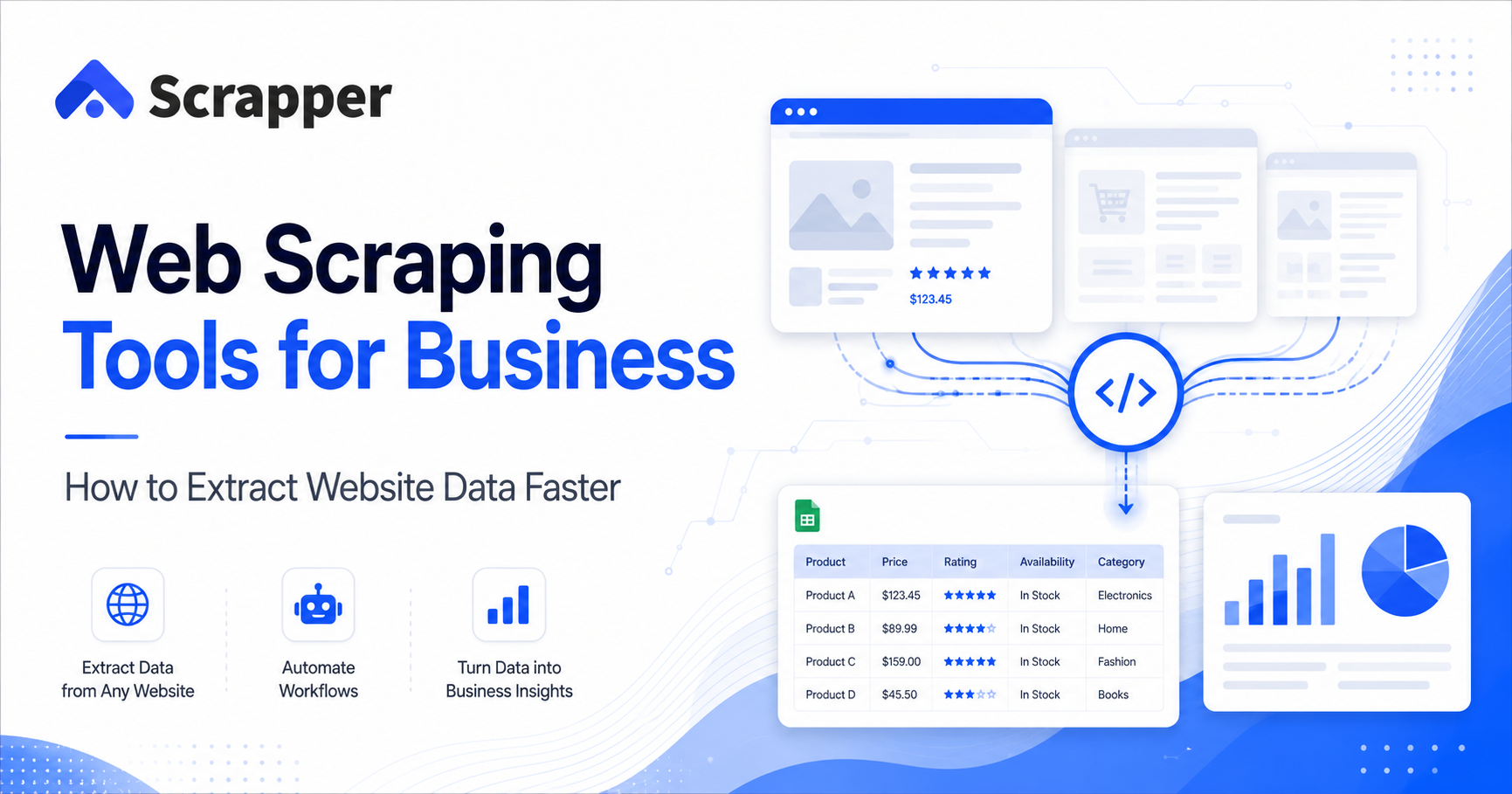

In today’s digital-first business world, data is one of the most valuable assets for any company. Businesses use data to find new customers, monitor competitors, compare prices, research markets, track product demand, and make better decisions.
But collecting useful data manually is slow.
A sales team may need business names, phone numbers, addresses, websites, and categories from online directories. An ecommerce seller may need product prices, ratings, and seller details from marketplaces. A recruiter may need company and job posting data from career websites. Doing all of this manually takes hours or even days.
This is where web scraping tools help.
Web scraping tools allow businesses to extract website data automatically and organize it into structured formats such as CSV, Excel, or JSON. Instead of manually copying and pasting information from hundreds of pages, businesses can use automation to collect cleaner and more useful data in less time.
In this guide, we will explain what web scraping tools are, how they work, why businesses use them, common use cases, key features to look for, and how Scrapper Tool can help simplify website data extraction and automation.
What Are Web Scraping Tools?
Web scraping tools are software applications that collect data from websites and convert it into a structured format.
A website may contain useful information such as business names, phone numbers, product prices, reviews, addresses, job listings, property details, or social media information. A web scraping tool helps extract this information and arrange it in rows and columns so businesses can use it for research, sales, reporting, or analysis.
For example, instead of opening 500 business listing pages one by one and copying details manually, a web scraping tool can help collect that information faster and export it into an Excel or CSV file.
Web scraping tools are commonly used to extract:
- Business names
- Phone numbers
- Email addresses where publicly available
- Website URLs
- Business categories
- Product titles
- Product prices
- Ratings and reviews
- Property listings
- Job postings
- Company information
- Social media data
- Search result data
The main goal is simple: turn unstructured website data into organized business data.
Read Also: How to Find Businesses Without Websites Using Google Maps
Why Businesses Need Website Data Extraction
Businesses depend on accurate and timely information. However, useful data is often spread across multiple websites, directories, marketplaces, search engines, and public platforms.
Manual data collection creates several problems:
- It takes too much time.
- It increases the chance of human error.
- It is difficult to scale.
- It becomes expensive when teams repeat the same work daily.
- It delays business decisions.
Website data extraction solves these problems by helping teams collect and organize data faster.
Here are the biggest reasons modern businesses use web scraping tools.
1. Faster Data Collection
Manual data collection is slow. If a team needs 1,000 business records, someone may spend hours opening pages, copying names, phone numbers, addresses, and website links.
A web scraping tool can speed up this process by collecting multiple data points automatically. This helps teams complete research and outreach preparation much faster.
For sales, marketing, ecommerce, and research teams, this time saving can make a big difference.
2. Better Accuracy
When people copy and paste data manually, mistakes are common. A phone number may be missed. A company name may be copied incorrectly. A price may be placed in the wrong column.
Web scraping tools reduce these errors by extracting selected data fields in a structured format. This improves data quality and helps teams work with cleaner information.
Clean data is especially important for lead generation, competitor monitoring, pricing research, and business reporting.
3. Improved Business Decisions
Businesses make better decisions when they have better data.
For example:
- A marketing agency can identify local businesses that may need digital services.
- An ecommerce seller can compare competitor pricing.
- A real estate consultant can analyze property trends.
- A recruiter can track hiring demand in specific industries.
- A sales team can build targeted lead lists.
Web scraping tools help businesses collect the information they need for better planning and faster decision-making.
4. Reduced Manual Work
Many teams still spend hours doing repetitive online research. They search websites, open pages, copy data, paste it into spreadsheets, clean the sheet, and repeat the same process again.
Web scraping and web automation can reduce this manual workload.
Instead of assigning team members to repetitive copying tasks, businesses can automate data collection and allow teams to focus on higher-value work such as sales calls, client research, campaign planning, and decision-making.
5. Competitive Advantage
Businesses that collect and analyze data faster can react faster.
For example, if an ecommerce business tracks competitor prices regularly, it can adjust its pricing strategy quickly. If a sales team finds new businesses in a target location before competitors, it can start outreach earlier.
Data gives businesses an advantage. Web scraping tools make that data easier to collect and use.
How Web Scraping Tools Work
Most web scraping tools follow a simple process.
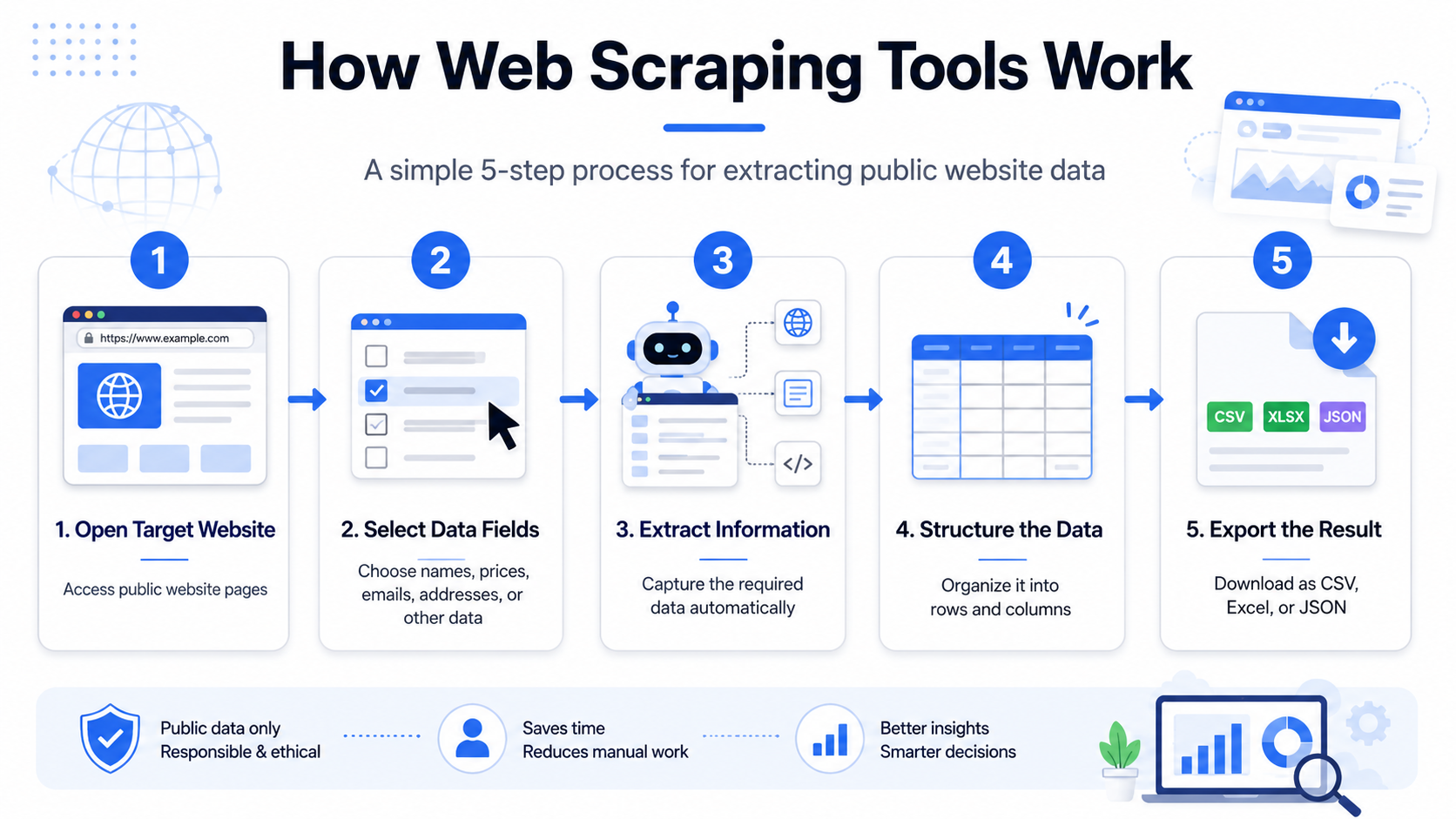
Step 1: Choose the Website or Source
The user selects the website, online directory, marketplace, search result page, or public data source from where data needs to be collected.
Examples include:
- Business directories
- Search engines
- Ecommerce marketplaces
- Real estate websites
- Job portals
- Social media pages
- Public company databases
Step 2: Select the Data Fields
The user decides which information should be extracted.
For example, from a business listing website, the required fields may include:
- Business name
- Phone number
- Address
- Website URL
- Category
- Rating
- Location
From an ecommerce website, the required fields may include:
- Product title
- Price
- Seller name
- Product URL
- Rating
- Review count
- Availability
Step 3: Extract the Data
The web scraping tool collects the selected information from the pages. Depending on the tool, this may happen through a browser extension, cloud-based tool, desktop software, or automation workflow.
Step 4: Organize the Data
After extraction, the data is structured into rows and columns. This makes it easy to review, filter, sort, and use.
Step 5: Export the Data
Most web scraping tools allow users to export the collected data into formats such as:
- CSV
- Excel
- JSON
CSV and Excel are commonly used by sales, marketing, and business teams because they are easy to open, edit, clean, and share.
Common Business Use Cases of Web Scraping Tools
Web scraping tools are used across many industries. Below are some of the most common business use cases.
Lead Generation
Lead generation is one of the most popular uses of web scraping tools.
Businesses can collect publicly available information from online directories, search results, business listing websites, and B2B platforms.
Sales and marketing teams may collect:
- Company names
- Contact details
- Website URLs
- Business categories
- Locations
- Ratings
- Industry information
This data can then be used to build targeted prospect lists and plan outreach campaigns.
For example, a digital marketing agency may want to find local restaurants, clinics, real estate agents, manufacturers, or businesses without strong online visibility. A web scraping tool can help collect this information faster than manual research.
Market Research
Market research requires large amounts of data from different sources.
Businesses may need to understand:
- Which products are trending
- Which locations have high business activity
- What competitors are offering
- How customers are reviewing products
- Which industries are growing
- What prices are common in the market
Web scraping tools help collect this information from websites and online platforms so businesses can analyze market trends more easily.
Competitor Monitoring
Competitor monitoring is important for ecommerce, service businesses, agencies, and startups.
Businesses can use web scraping tools to track:
- Competitor product listings
- Pricing changes
- Product descriptions
- Customer reviews
- New services
- New offers
- Market positioning
This helps businesses understand what competitors are doing and adjust their own strategy.
For example, an ecommerce seller may monitor competitor product prices. A local service provider may monitor competitor listings and reviews. A marketing agency may research how competitors present their services online.
Ecommerce Price Tracking
Ecommerce businesses often need to monitor product prices, availability, ratings, and reviews.
Web scraping tools can help collect:
- Product names
- Prices
- Discount information
- Seller details
- Availability
- Ratings
- Review counts
- Product URLs
This data can support price comparison, product research, inventory analysis, and marketplace intelligence.
For ecommerce sellers, this is especially useful when researching products, tracking competitors, or identifying pricing opportunities.
Product Research
Product research is another important use case.
Online sellers can use website data extraction to study:
- Product demand
- Pricing patterns
- Top-selling categories
- Review trends
- Seller competition
- Product availability
Instead of guessing which products may work, businesses can use data to make better product decisions.
Real Estate Research
Real estate professionals can use web scraping tools to collect public property data for research and analysis.
Useful data may include:
- Property listings
- Rental prices
- Sale prices
- Property locations
- Property descriptions
- Agent details
- Area trends
This information can help investors, brokers, and property consultants understand market movement and compare opportunities.
Recruitment and Job Research
Recruiters and HR teams can use web scraping tools to collect hiring-related data from job portals and company websites.
They may collect:
- Job titles
- Company names
- Job locations
- Required skills
- Salary ranges where available
- Hiring trends
- Industry demand
This helps recruitment teams understand which companies are hiring, what skills are in demand, and where opportunities are growing.
Read Also: How to Scrape Data from Website Using Chrome Extension (No Coding Needed)
Search and Business Intelligence
Businesses can also use web scraping tools for search result data, company research, and public business intelligence.
For example, teams may collect:
- Search result URLs
- Company names
- Public business details
- Directory listings
- Review data
- Location-based information
This helps with SEO research, market mapping, outreach planning, and competitor analysis.
Key Features to Look for in a Web Scraping Tool
Not every web scraping tool is suitable for every business. Before choosing a solution, businesses should check whether the tool fits their workflow, skill level, and data requirements.
Here are the most important features to look for.
Easy-to-Use Interface
A good web scraping tool should be simple enough for non-technical users.
Many sales, marketing, and research teams do not have coding knowledge. A clean and user-friendly interface helps them extract data without depending on developers.
No Coding Required
No-code web scraping tools are useful for business teams that want quick results.
Instead of writing scripts, users can select data fields, run extraction, and export results in a simple format.
This is especially helpful for:
- Small businesses
- Marketing agencies
- Sales teams
- Freelancers
- Researchers
- Ecommerce sellers
CSV and Excel Export
Most business teams prefer CSV or Excel because the data can be easily opened, filtered, cleaned, and shared.
A good tool should allow users to export data in practical formats such as:
- CSV
- Excel
- JSON
CSV and Excel are ideal for sales lead lists, product research sheets, competitor comparison sheets, and market research reports.
Automation Capabilities
Automation is one of the biggest benefits of web scraping tools.
A good tool should help users reduce repetitive work such as:
- Opening pages manually
- Copying information
- Moving between pages
- Collecting similar data again and again
- Exporting repeated reports
Web automation saves time and helps teams work faster.
Accuracy and Reliability
Data accuracy is very important.
A useful web scraping tool should extract the correct information consistently. If the extracted data is messy, incomplete, or inaccurate, teams will spend more time cleaning it.
Businesses should choose a tool that provides reliable extraction and clean output.
Scalability
A small business may need a few hundred records. A growing agency may need thousands of records across different categories, cities, or platforms.
The tool should be able to support growing data requirements without making the process too difficult.
Support for Different Use Cases
Businesses may need data from different types of websites.
A good data extraction solution should support multiple use cases such as:
- Business directory extraction
- Ecommerce data extraction
- Real estate data extraction
- B2B lead generation
- Job data extraction
- Search result extraction
- Social media data collection
- Web automation workflows
Web Scraping Tools vs Manual Data Collection
Manual data collection may work when you only need a few records. But when the data requirement grows, manual work becomes slow, expensive, and difficult to manage.
Here is a simple comparison.
| Factor | Manual Data Collection | Web Scraping Tools |
|---|---|---|
| Speed | Slow | Faster |
| Accuracy | Prone to human error | More consistent |
| Scalability | Difficult | Easier |
| Cost | Requires more manual effort | Reduces repetitive work |
| Output | Often unorganized | Structured CSV/Excel |
| Best for | Small one-time tasks | Repeated or larger data tasks |
For modern businesses, web scraping tools are useful when the same type of data needs to be collected repeatedly or at scale.
How Scrapper Tool Helps Businesses Extract Website Data
Scrapper Tool is designed to simplify web scraping and web automation for businesses. It helps users collect publicly available website data and export it into structured formats for business use.
The platform is useful for teams that want to reduce manual copy-paste work and collect data faster without complex technical setup.
We can support different types of users, including:
- Marketing agencies
- Sales teams
- Ecommerce businesses
- Researchers
- Real estate professionals
- Recruiters
- Startups
- Local businesses
- Freelancers
Businesses can use us for lead generation, product research, competitor monitoring, market research, and data collection workflows.
Scrapper Tool Data Extraction Solutions
We offers specialized data extraction and automation solutions for different industries and platforms.
Business Directory Extraction
Business directory scraping helps teams collect local business data and contact details from public listing sources.
Our solutions include:
These tools can help businesses collect business names, categories, locations, contact details, ratings, and website information for lead generation and research.
Ecommerce Data Extraction
Ecommerce data extraction helps sellers, agencies, and researchers collect product and pricing information from online marketplaces.
Our solutions include:
- Amazon Scraper
- Flipkart Scraper
- Alibaba Scraper
- AliExpress Scraper
- eBay Scraper
- Etsy Scraper
These tools can support product research, price monitoring, seller research, and competitor analysis.
Real Estate Data Extraction
Real estate professionals can use data extraction tools to collect public property information for market research.
Our solutions include:
- Zillow Scraper
- Airbnb Scraper
- Housing Scraper
- 99acres Scraper
- Magicbricks Scraper
These tools are useful for property research, rental analysis, listing comparison, and location-based market study.
B2B Lead Generation Tools
B2B businesses often need supplier, manufacturer, seller, and buyer information for outreach and research.
Our solutions include:
- IndiaMART Scraper
- TradeIndia Scraper
- SellerMart Data Scraper
- Website Data Extractor
- IndiaMART Lead Manager
These tools help businesses identify potential customers, suppliers, sellers, and market opportunities.
Job and Recruitment Data Extraction
Recruiters and HR teams can use job data extraction tools to collect hiring information from public job listing platforms.
Our solutions include:
- Indeed Scraper
- Naukri Scraper
- Shine Scraper
- Glassdoor Scraper
- PlacementIndia Scraper
- Jobs Scraper
This data can help recruitment teams analyze hiring demand, job trends, company activity, and skill requirements.
Search and Market Intelligence Tools
Search and market intelligence tools help businesses collect public search and company data for research.
Our solutions include:
- SERP Scraper
- Shopping Results Scraper
- Zaubacorp Scraper
These solutions can support SEO research, product research, company intelligence, and competitive analysis.
Social Media and Communication Tools
We also provides tools that support marketing and communication workflows.
Solutions include:
- Facebook Scraper
- Social Media Scraper
- WhatsApp Sender
These tools can help businesses with audience research, social media data collection, and customer communication workflows.
Web Automation Solutions
Along with web scraping tools, Scrapper Tool also supports web automation workflows. This helps users automate repetitive browser-based tasks and reduce manual effort.
Web automation can be useful for:
- Repeated website actions
- Data collection workflows
- Lead research
- Form-based tasks
- Export workflows
- Repetitive online research
For businesses that regularly collect data from websites, web automation can save time and improve productivity.
Read Also: Best Web Scraping Tools
Best Practices for Responsible Data Extraction
Web scraping should be done responsibly. Businesses should focus on collecting publicly available data and using it in a fair, accurate, and compliant way.
Here are some best practices to follow:
1. Collect Only Relevant Data
Do not collect unnecessary information. Before starting a scraping task, define exactly what data fields are needed.
For example, if your sales team only needs business name, location, category, phone number, and website URL, avoid collecting unrelated data.
2. Respect Website Rules
Different websites may have different rules for data access and automated activity. Businesses should review website terms and avoid activities that may violate rules or create unnecessary load.
3. Avoid Sensitive Data
Businesses should avoid collecting sensitive personal data. Focus on public business information, product information, market data, and research data.
4. Keep Data Clean
Collected data should be checked and cleaned before use.
Common data cleaning steps include:
- Removing duplicates
- Formatting phone numbers
- Checking empty fields
- Validating website URLs
- Organizing columns
- Removing irrelevant rows
Clean data improves outreach, reporting, and decision-making.
5. Use Data for Legitimate Business Purposes
Extracted data should be used responsibly for research, analysis, sales planning, competitor monitoring, or business intelligence.
Avoid spammy or misleading outreach. Good data should help businesses communicate better, not create poor user experiences.
6. Update Data Regularly
Website data changes over time. Phone numbers, prices, addresses, product availability, and business details can become outdated.
Businesses should update important datasets regularly to maintain accuracy.
Future of Web Data Extraction and Automation
As businesses continue to move online, the demand for structured data will keep growing.
Modern organizations are using data to:
- Improve customer targeting
- Monitor competitors
- Optimize pricing
- Research products
- Identify sales opportunities
- Track market changes
- Automate repetitive workflows
The future of website data extraction will be more connected with automation, AI, cleaner data workflows, and business intelligence systems.
Companies that use data collection and automation effectively will be better prepared to make faster decisions and find new opportunities.
FAQs About Web Scraping Tools
What are web scraping tools?
Web scraping tools are software applications that collect data from websites and organize it into structured formats such as CSV, Excel, or JSON. Businesses use them to extract product data, business listings, pricing information, reviews, job posts, and other public website data.
Why do businesses use web scraping tools?
Businesses use web scraping tools to save time, reduce manual copy-paste work, collect accurate data, monitor competitors, generate leads, perform market research, and export data into spreadsheets for analysis.
Can web scraping tools export data to Excel?
Yes. Many web scraping tools allow users to export extracted data into CSV or Excel files. This makes it easier to filter, clean, analyze, and share the collected information.
Do web scraping tools require coding?
Some web scraping tools require coding, but many modern tools are designed for non-technical users. No-code and browser-based scraping tools allow users to collect data without writing scripts.
What type of data can businesses extract from websites?
Businesses can extract public data such as business names, phone numbers, addresses, product titles, prices, ratings, reviews, property listings, job posts, website URLs, and category information.
Is web scraping useful for lead generation?
Yes. Web scraping can help sales and marketing teams collect public business information from directories, search results, and other online sources. This data can be used to build targeted lead lists for outreach.
What is the difference between web scraping and web automation?
Web scraping focuses on extracting data from websites. Web automation focuses on automating repetitive actions in a browser, such as clicking, navigating, filling forms, or collecting data through repeated workflows. Many businesses use both together.
How can I choose the right web scraping tool?
Choose a web scraping tool based on ease of use, no-code support, export options, accuracy, scalability, automation features, and whether it supports your specific business use case.
Conclusion
Web scraping tools have become important for modern businesses that need faster and cleaner website data extraction.
Instead of spending hours copying and pasting information manually, businesses can use web scraping and automation tools to collect structured data for lead generation, market research, competitor monitoring, ecommerce analysis, real estate research, recruitment, and business intelligence.
The right web scraping tool can help reduce manual work, improve data accuracy, save time, and support better business decisions.
Scrapper Tool helps businesses simplify website data extraction and web automation by providing specialized scraping solutions for different industries and use cases.
If your business wants to collect public website data faster, reduce repetitive work, and export information into structured formats, we can help make the process easier and more efficient.
Explore Scrapper Tool(web scraping and web automation) today and simplify your business data collection workflow.
